
November 2026 update. This article asks how PHP and Vue can work together. The more useful first question for me now is which part of the page needs Vue at all. Antsand's generated HMVC pages can deliver readable HTML and CSS without asking a browser application to rebuild the whole view. A focused JavaScript component is valuable when it handles a real interaction, such as editing or filtering, rather than merely recreating navigation.
This was a real Antsand integration problem at the time. The current generated blog pages instead arrive as server-rendered HTML and CSS with focused vanilla JavaScript; this page loads no Vue bundle. Some older Antsand editor and Forms screens still use Vue, so I would not claim the entire platform has removed it. Keep the original integration walkthrough as an example of one boundary. For a current project, decide who owns the data, how the server checks access, what happens without JavaScript, and how errors reach the user before picking a frontend framework.
Have you tried to put PHP/Phalcon and Vue on the same page and wondered where one should stop and the other should begin? I ran into that question while building Antsand.
Both frameworks are very powerful, yet there is very little documentation or information on how to integrate them seamlessly. Phalcon runs on the server; Vue runs in the browser. They can work well together, but only if each has a clear responsibility. Adding Vue to every page would not automatically make the application easier to maintain.
I will show how I structured the Phalcon code, where the Vue components lived, and how data crossed the boundary between them. Highly recommend reading this article from start to finish as it touches on some fundamental concepts. Every idea thus, is built on these core principles.
This article is for intermediate to advanced users, but even a novice user will gain a lot from it. Though this article is written with Phalcon PHP and Vue.js in mind, the underlying questions about page ownership and data flow apply beyond these particular tools. This article is more on theory. If you want just pure code examples, please check this article out.
On the other hand, this article is not a how-to-guide on how to install, use or learn phalconphp or Vue.js. We will touch on how they work and give examples. For an indept knowledge on these frameworks please read the official documentation. For that matter, a basic understanding of how server code works, how javascript and the internet works can help you gain a lot more from this article. Also, we will not be comparing different frameworks. We have chosen to explain phalcon php and vue.js as both these frameworks are used extensively in building software at ANTSAND.
So, what is the best way to integrate Phalcon + Vue.js?
Before we delve deep into the integration, we 1st must understand the strength and weakness of these frameworks. Further, we need to understand what is PHP, what is javascript and how they work.
Phalcon is an MVC framework implemented as a PHP extension. In this example it gives me controllers and views for organizing server-side work. PHP itself only runs on the server. Fundamentally this is what php or any server-side code does.
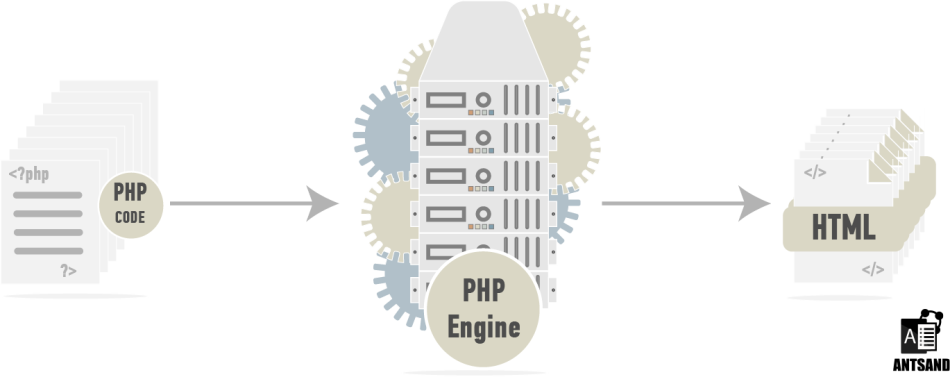
The web browser cannot interpret php code or any server-side code.
On the other hand, vue.js is a javascript library. Javascript is a programming language that web-browsers understand. Its main feature is to manipulate DOM (document object model) to add interactivity to the website. Vue is a JavaScript framework for building interfaces. If a page needs only a small interaction, a full Vue build may be more than you need. On the other hand, if you have 1000’s of lines of javascript code and finding it hard to maintain your code base, using a framework is quite essential.
A browser receives HTML, CSS, JavaScript, images, and other resources. PHP runs on the server and sends an HTTP response; that response can be HTML, JSON, or another format. In this walkthrough Phalcon renders the page shell, while Vue requests data for one interactive region.
Note: A web-browser can also interpret data objects or other markup languages like JSON and XML. The browser for the most part receives these objects using API's through AJAX calls. These objects are then interpreted by javascript which renders the data to the DOM. For more on these objects check out the next article - Using restful API between php and vue components
For this build, I thought of the page as two paths:
PHP ------> PHP Engine -----------------------------> HTML
*.Vue ----> Vue engine(webpack/broserify) ------> Javascript
*.scss -----> Sass Engine (webpack/gulp/grunt) --> CSS
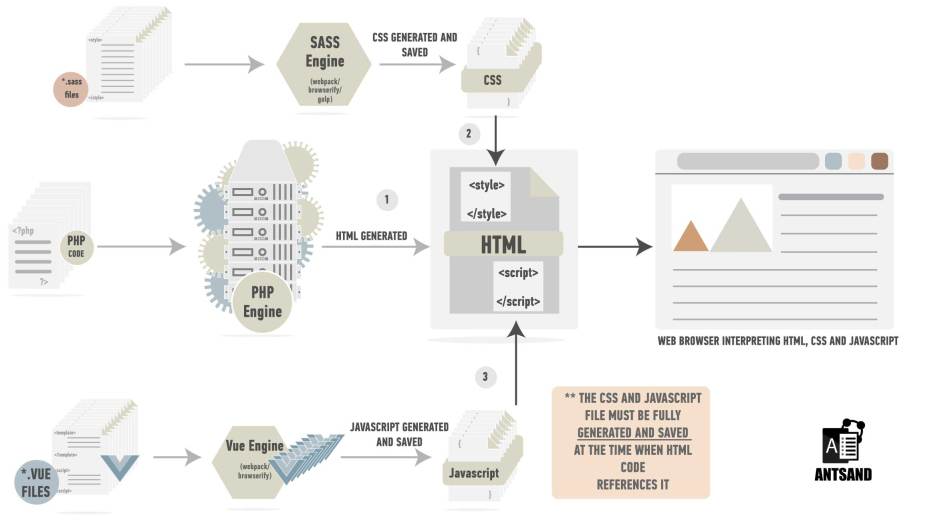
The outputs of all these engines can now be understood by the browser.
The goal was to let the HTML from PHP and the component from Vue meet at a deliberate boundary. Javascript’s main goal is to manipulate DOM objects, and HTML’s content is nothing but DOM objects. The code generated by php must have elements or DOM objects that javascript (generated by vue) can control. This is fundamental to making these frameworks work.
We can tell php to generate particular HTML tags for it to be further controlled by javascript. For e.g. we can echo
*.Vue -> javascript -> look for “let-vue-fill-this-tag” in the html file. If found, we can now manipulate this tag. If not found, do nothing.
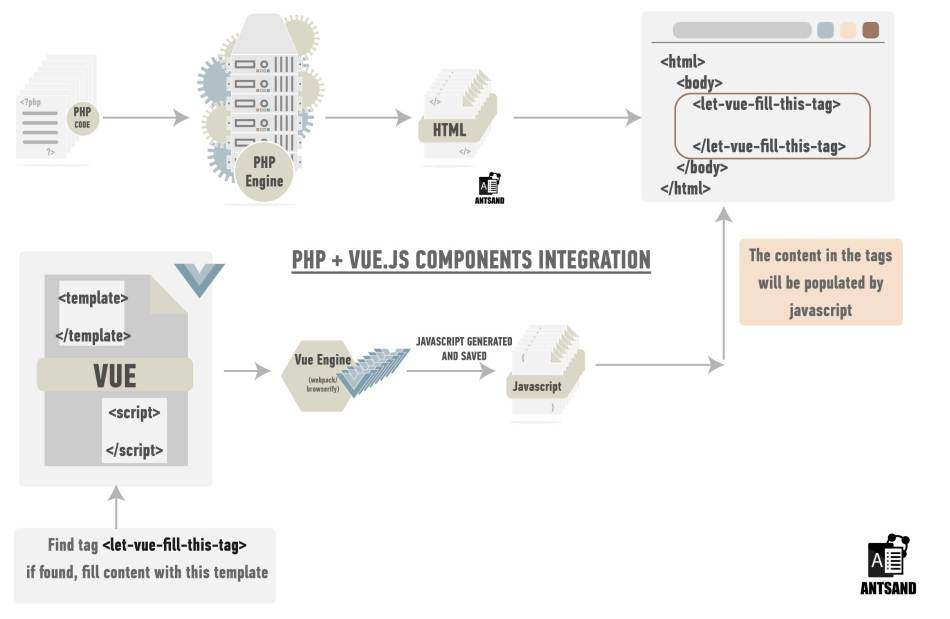
Understanding how php and javascript work under the hood is part of the equation. The next question to answer is, how should you structure your code?
To explain this, we need to understand how the server and php work together.
The web server listens for requests and routes each one to the right handler. When you type antsand.com on the webbrowser, the browser communicates with a DNS server, translates Antsand.com to an ip/ipv6 address, obtains the ip/ipv6-address, packages a set of information into packets and sends that information to a computer with that specific address over a bunch of routers. The computer with that ip/ipv6-address is where the code for Antsand.com resides. When this computer receives this information, it looks at the packet and checks for programs in the computer that can handle this request. Since the packet that was created by the web-browser is a tcp packet on port 80 or 443, a webserver is listening for any request on those ports. Port 80 and 443 are standards ports for websites. Once, the webserver deciphers the packets, it then looks for what information the browser is requesting. If the page that the browser is requesting needs to be serviced by a 3rd party server, the web-server will send that information to such a server. In this case the 3rd party server is the php engine.
Webbrowser -> router -> Computer(Antsand.com) -> webserver (nginx) -> search for *.php files -> if found send to -> php server (php-fpm)
Webbrowser (html) <- router <- Computer(Antsand.com) <-webserver <- html file <--- php server(php-fpm)
Webbrowsers -> scans html -> request more information defined in html -> CSS/images/javascript
The above steps are repeated till all the information defined in HTML is properly loaded in the webbrowser.
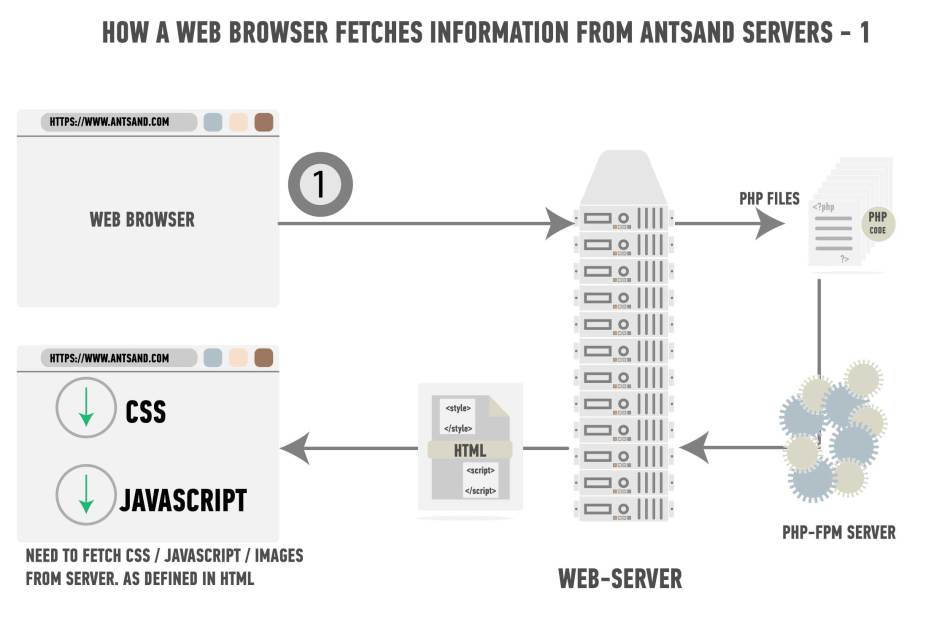
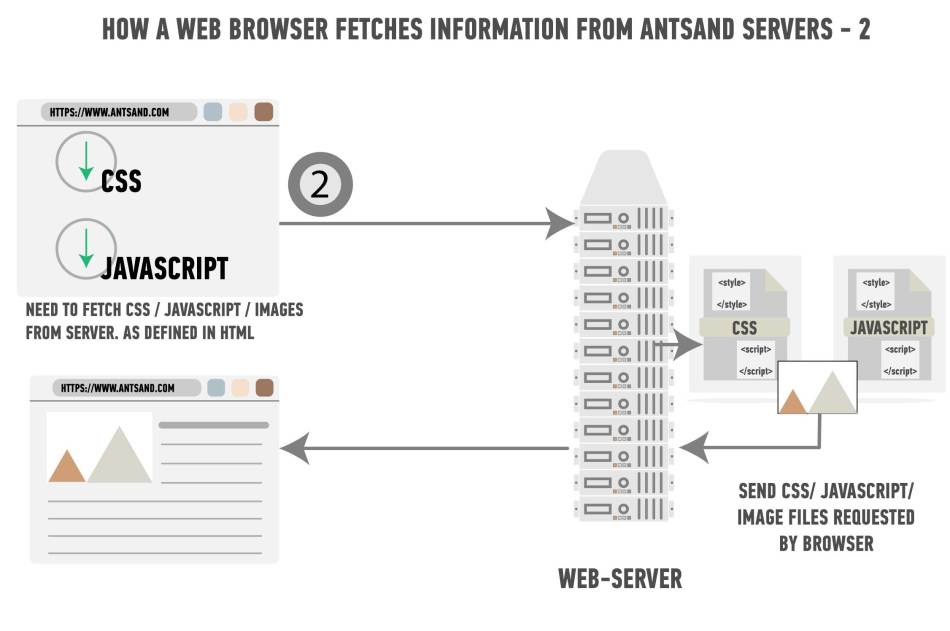
What this implies is that the html generated by php might need additional interactivity through javascript. This is what you have in control. What parts of the html you want php to generate and what parts of the html you want javascript to take control.
What is important in the above explanation is that the web-server communicates with php-fpm to generate html from *.php files in real time, wheras the server treats javascript as a file and does not communicate with any 3rd party server to generate javascript files in real time. The javascript files must already exist as a file. With the introduction of node.js and modern servers, this may not be the complete case, but for the sake of this argument and for most production use cases, javascript is not produced in real time. Therefore *. Vue component files must already be converted to .js files when php’s html references the javascript file.
When designing a webpage, you need to know what parts of the html should be generated by php and what parts of the webpage you want javascript to load through AJAX. Once this is defined the rest is just planning and execution.
There are various ways to do so, but this is how we at ANTSAND approach this problem. The main logic of your application is written in server-side code. Your server-side code has all the information on how each page of your website must load, what content to display, how your website is to be navigated and how each webpage of your website flows with respect to the other. It contains the core logic of how your website should be navigated. As a result, javascript must sit on top of each rendered page.
Php Phalcon being an MVC, this is how the code structure at ANTSAND looks like:
Module -> (Model, View, Controller, Vue)
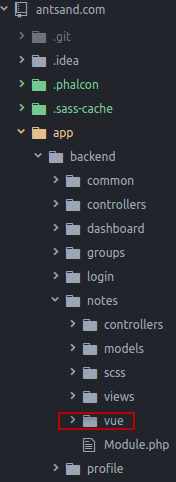
Each module in Antsand code structure has a Vue folder. This is where all the *.vue files are located. We want to keep all the vue components related to this php module under one directory. The output of the vue component is then generated to the public folder structure where the web-server can find the file. The javascript file is generated based on the *Vue components. We don’t need to touch the generated file. All we need to make sure is where the file will be generated and if the web-server can find it.
A deep dive into how php-phalcon works or for that matter any MVC.
A MVC is a Model View Controller. Generally, the Models folder contains files that interact with the database and contains core server logic. The Controller folder contains files that help is designing how you want users to navigate through your application and what content you want different users to see. The View folder contains files that tell php how you want HTML to be literally generated. In Phalcon, if integrating the volt engine, your view folder would then have volt files, that are converted to php by the volt engine which is then used to generate HTML files.
Why is this important?
Understanding how MVC works will give a much clear understanding of how you want your code to be structured and how you can make both these frameworks work together. When HTML code is populated through the javascript framework, in this case vue, you want to know how vue is going to populate the content. Vue would be using AJAX calls, which would be calling phalcons-php code and asking it for specific information which it can then render under a specific html tag. Let me give an example.
This below picture is the antsand blogging dashboard
We have 3 different components to it.These three tags are defined in php and echoed as HTML tags. After the browser loads this HTML page with these empty tags, we want those tags to be populated by javascript. Therefore we have divided our vue application into components.
a. Profile information
b. The blog navigation panel
c. The editor space
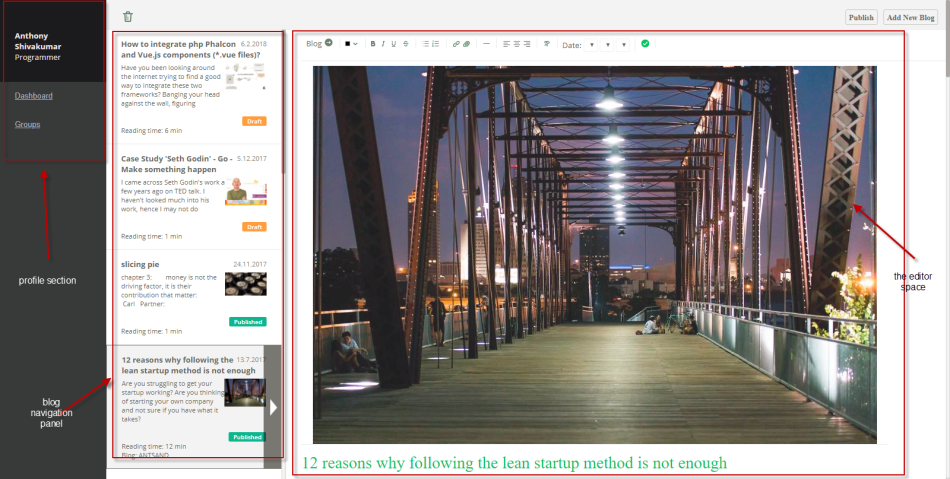
The visual display for each of these components is written in *.vue files.
The data that needs to populate this content has to come from a database. Javascript written using *.vue components makes AJAX calls which calls php-phalcon, phalcon does all the processing, assembles the data as a JSON object and sends the information. Javascript receives this information and displays the content of the JSON file in a visually elegant way.
Just as how we want our front end to be divided into different components, we need to have different controller actions in phalcon that explicitly help in providing the relevant data to each of these vue components. This way, we know that each controller action in phalcon has a specific purpose and is tightly coupled with interacting with vue components for the data requested.
When designing your application, you need to think,
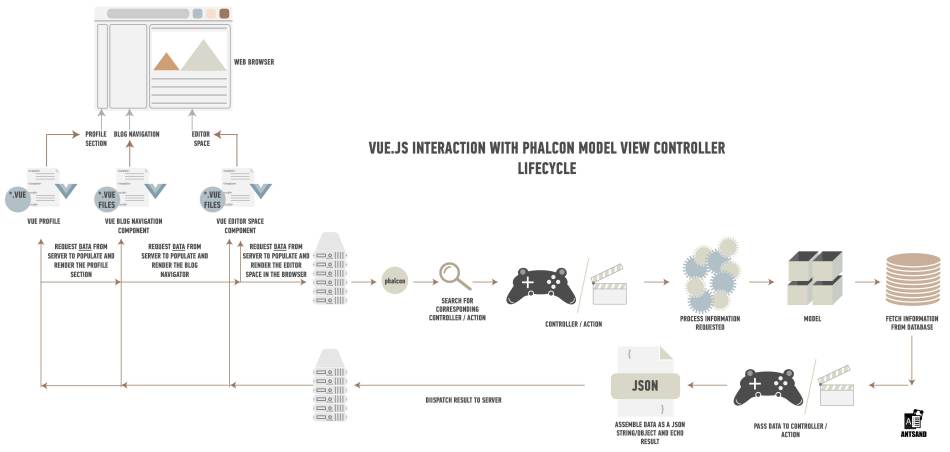
*.vue component -> makes a (ajax request) -> request data from a particular link -> phalcon reads the link, forwards the information to the necessary controller and action -> fetches data from the database -> echo's the result in a JSON string/object. Vue read this string and display the content accordingly. That is the request-and-response path between this Vue component and Phalcon.
The below image represents a visual workflow.
Next, How does vue.js work? What are vue.js components and how do they work in vue.js?
Now comes the big question. How does it work. Vue.js is not another jquery like framework. You can technically use both jquery and vue together as they both serve different purpose in writing javascript code. Just as how php-phalcon is a MVC framework to write modular php code, Vue.js is a framework to write modular javascript code. It's main purpose is to separate different elements of a webpage into components. Each component can then render elements of a page accordingly. This help maintain your codebase. It also helps in scaling your javascript application. *Vue files are vue component files that have information on how to render that particular component. It has the logic of where in the HTML file this component needs to fit. Accordingly you can write a template and add logic to that template using javascript. The vue engine will then take all the vue files and compile them into one big javascript file. You can control how you want the javascript file to be rendered. You can even have each component have its own javascript file. Depending on your application, you need to make the judgement.
Now that all the concepts are explained, in the next article I will give a live example. We will create a simple application where we can render a simple "hello World" page, integrating phalcon and *vue components.
I hope you found the information in this article worthwhile. If you have any questions, or feel some of the information might be incorrect, please comment below. I will be glad to hear your comments. If you have implemented a similar boundary, tell me where it became awkward. The folder structure shown here is a historical example, not a current download offer.
Conclusion:
Please comment below if you have questions, ideas or how you can apply it. At ANTSAND, we apply everything we preach and teach. What we put out is based on our experience, our failures and success. We love to be transparent, as it really brings out the best in us.
The $5 monthly marketing package mentioned in the original article was an idea, not a current offer. Tell me which part of this guide helped and what still needs work.
If you want to read other blogs that might interest you, have a look below.
More Stuff from ANTSAND
Business, UI and UX:
Marketing Made Easy. Ultimate guide to making your business more marketable and profitable
Speed of Implementation for UI and UX startups
8 steps to create world class UI and UX for your startup
12 mindsets and behaviors required for running a lean startup
12 ways to maintain your website and increase sales
My mental maps for success:
39+ mental tools I use to make better decisions
If you are a programmer, you can read more on our Programming blogs:
How to integrate php and vue.js components
Integrating, php, vue and webpack with code examples
Creating restful API's using php and vue