
November 2026 update. The PHP and Vue examples below are a snapshot of how I connected an interface to an API. The current generated blog page does not use Vue: it starts with server-rendered HTML and CSS, then adds vanilla JavaScript where a reader needs interaction. Legacy Antsand Forms and Notes screens still contain Vue, so this is an evolution of the publishing path, not a platform-wide removal of the framework. Today I would define the contract before choosing the client framework: which actor may call an endpoint, what input is accepted, what a failure returns, and whether repeating a request is safe. An agent using that API needs the same clear contract as a browser.
For example, an article-save endpoint should reject an unauthorized group, validate the content, return a stable result, and avoid silently changing the article's other site memberships. A deployment endpoint should distinguish accepted, completed, and failed work. HTML responses are not inherently wrong either: server-rendered pages can be the simpler choice when there is little interaction. Keep the tutorial's code in its historical context and test these boundaries in any current implementation.
Have you started working with Vue and PHP/Phalcon and wondered where the boundary between them should be? Here I build an API in PHP/Phalcon and call it from Vue. The example is historical, but the request-and-response boundary still matters. We will design these API's and program vue to call these API's using AJAX.
In the previous articles, I wrote on the theory, on how to get started using vue and php (phalcon). I also covered how to configure your php phlacon application with vue. In this article we will be expanding on those concepts and dive deep into passing data between these two frameworks.
Phalcon can return an HTML page or a structured response such as JSON. Choose the response that matches what the client actually needs.
For the component in this example, I chose JSON because Vue owns the changing part of the page. Returning HTML is not inherently unscalable, nor does it automatically rule out Vue. A server-rendered page with a small interactive component can be a good design. On the other hand, designing your backend application with a restful API in mind, can help you design vue phalcon applications seamlessly.
If a Vue component owns the markup for a changing region, I prefer to send it structured data instead of a second copy of the same markup. Now, not only do you have to maintain HTML in vue, but you also need to make sure the HTML response you get from phalcon is compatible with vue. For this example, JSON keeps the responsibilities clearer. HTML fragments can still be appropriate in other designs.
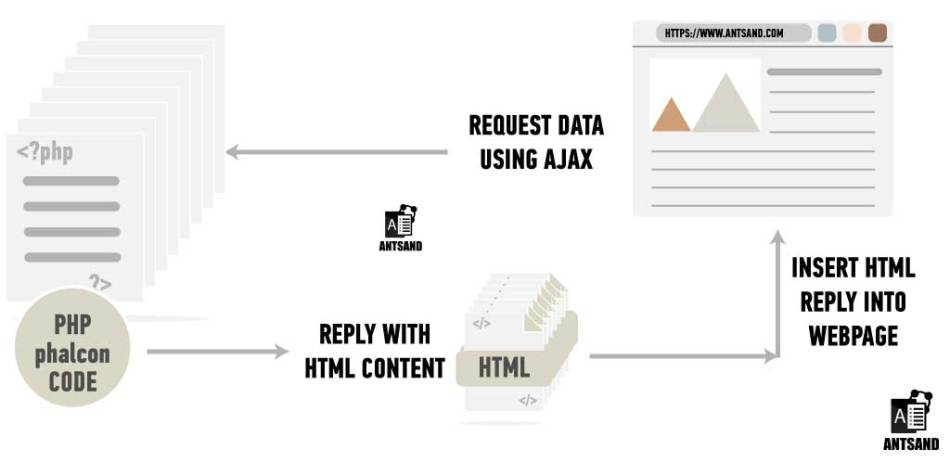
Mixing server-produced HTML and Vue-managed markup needs an explicit ownership boundary. If Phalcon and Vue both try to control the same markup, it can be hard to tell which side is responsible for an update. Decide that boundary first; HTML from the server is not itself the problem.
Vue can manage a component and update its DOM from data. In this example I let Vue render one region from JSON while Phalcon renders the surrounding page. Returning HTML elsewhere does not stop Vue from working; the important choice is who owns each region.
A better approach is to use data objects for e.g JSON. JSON is a practical format here: PHP can encode it, and JavaScript can parse it. Both languages can parse JSON, but they cannot tell you whether a field has the right meaning. Define and test the contract. All you need to do, is plan how the JSON object should be designed and how each element needs to be interpreted.
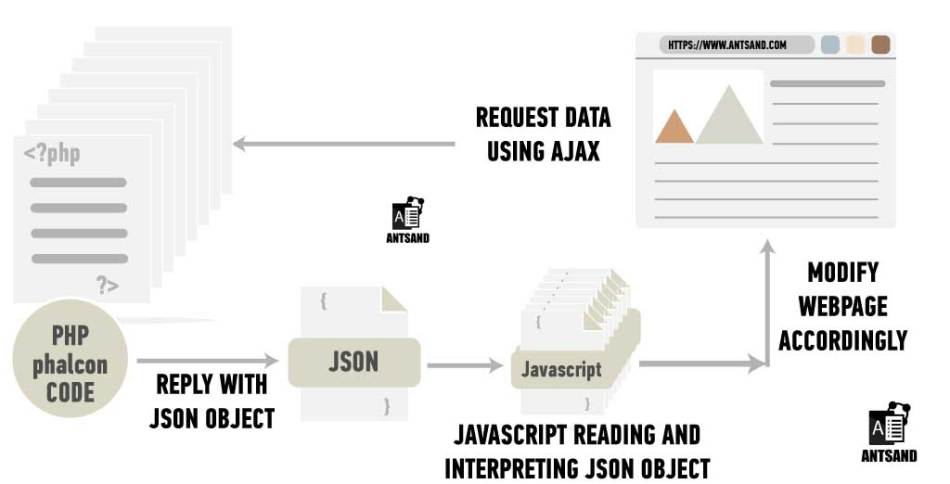
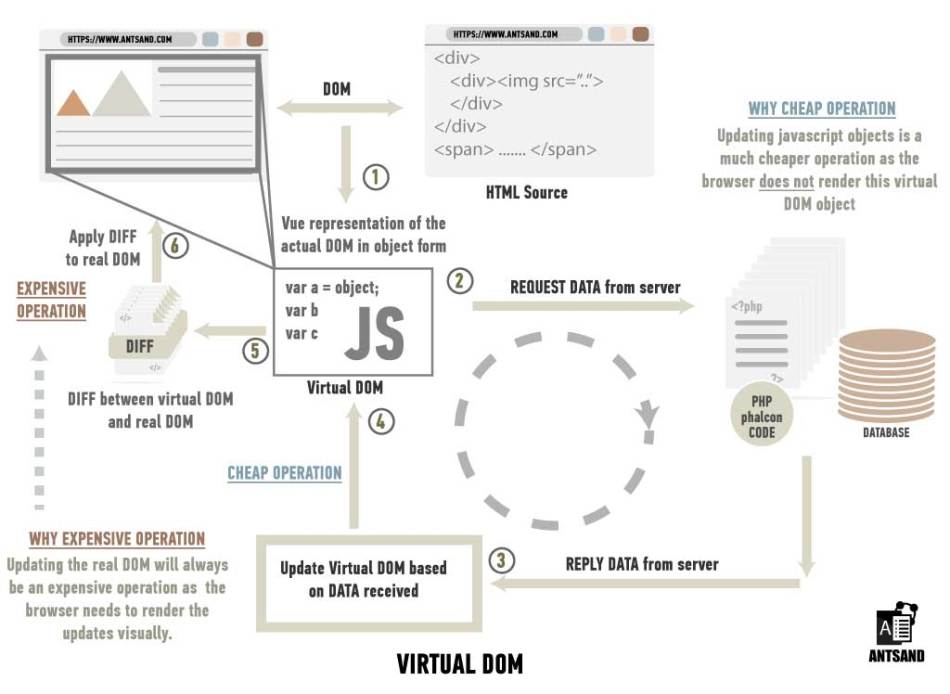
There are so many advantages using this approach. One, php does not control the HTML content, controlled by vue. Vue has full control over it. If vue needs to update elements of a component, it can request data from php, and the JSON reply will allow it to populate the HTML page accordingly. If something needs to be changed, you can manipulate the JSON object without changing the HTML. Not to mention, your application is much more scalable, vue will be able to use its virtual DOM capabilities and data will be much smaller compared to an html reply.
Let us now continue building our ecommerce application. In the previous article "Integrating Phalcon, vue components and webpack with code examples", we got started setting up these frameworks. Here, we will dive deep into populating the content of our ecommerce website from a database. Let us continue from where we left of.
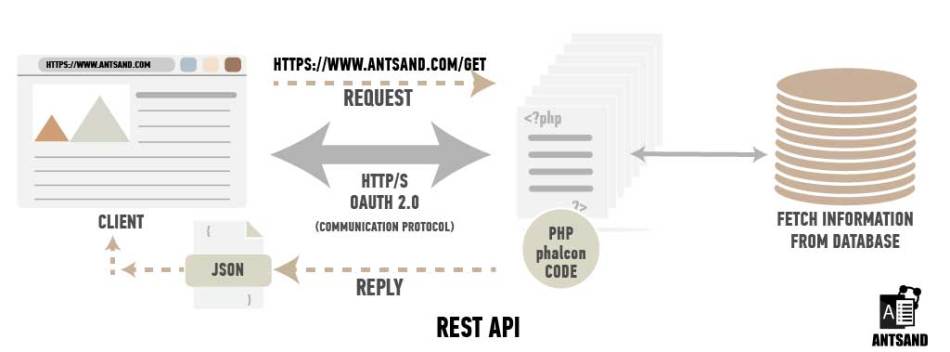
Vue acts as a template for interpreting data, but the actual content will come from phalcon using specific API's . Let us start by designing RESTful API's in phalcon. Before we dive into programming the API's, it is worthwhile to spend time understanding what the API is all about and how the data should be designed
How should you design your API's?
Few rules to keep in mind.
Identify key participants -> Who is it, that is going to use this API? Is it going to be used internally or externally? For this tutorial, our API's are going to be used internally and only by vue. In many applications, you might want external stakeholders to access your API's. Depending on your application, design your API's accordingly.
Identify your system boundaries-> Who is the API NOT for? Clearly identify who can use these API's and who cannot. Describe what is the purpose and what should be its content.. If you need to authenticate your users or clients and allow only selected users to access the API, you would need to authenticate and authorize them. If other applications would like to have access to your API's you might need to use OAuth 2.0. In this application, we don't need any authorization. Let us keep it simple.
Identify activities -> What is the purpose of this API? Is it to read data, update data, create new data or delete data? Depending on what activity the API performs, you can name it accordingly. Give each operation a clear method, route, authorization rule, and response. A resource can support more than one operation without becoming an ambiguous endpoint. For this application, we will only be reading data.
Next, let us define what REST is and what it is not.
What is REST?
REST stands for Representational State Transfer. One thing to keep in mind is, REST is NOT a protocol. REST is an architectural style, not an HTTP method or wire protocol. HTTP has its own standards, and REST describes constraints for using such interfaces. On the contrary, REST is built on existing client server architecture. It helps us to design, better ways of working and communicating between client and server. You can read more on what defines REST and it's constraints here. Now that we have some idea on how to design our API's, let us plan out how we will be structuring the data in JSON.
How should you structure the content in your JSON file?
You might think of designing your own content or data format inside JSON. I would highly recommend not doing so. You creating your own structure is similar to you creating your own image format to see an image. You would rather use existing formats like JPEG or PNG to view an image. Similarity, when it comes to the content of your JSON files,it is better to use a standard. There are couple of standards one can choose from.
2. Hypertext Application Language (HAL)
4. Siren
5. JSON-LD
6. JSONAPI
7. Mason
8. UBER
9. OData
10. Atom
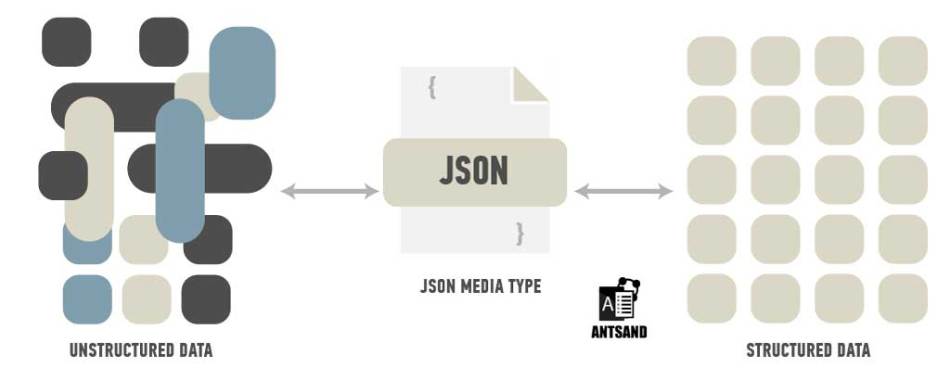
In this article, we will structure our content using the IonHypermedia Type. It is intuitive to read and easy to structure data. Next, let us design our API functions, program these API's in phalcon and fetch it using vue.
Designing our API's in Phalcon
There are numerous ways one can write API's in phalcon. In this use case, we will create a controller specifically for API's and each controller action would correspond to the api's activity i.e. read, write delete or update. In this tutorial, the controller reads data, assembles a JSON response, and returns it to Vue. It need not write a physical JSON file for each request. Vue would then read this JSON file, interpret the data and accordingly display its content in an elegant manner.
In this ecommerce example which is about selling stunning website templates, the content of the JSON file must have information on the type of template, the template image, the cost, the author, the discount amount and the ratings.
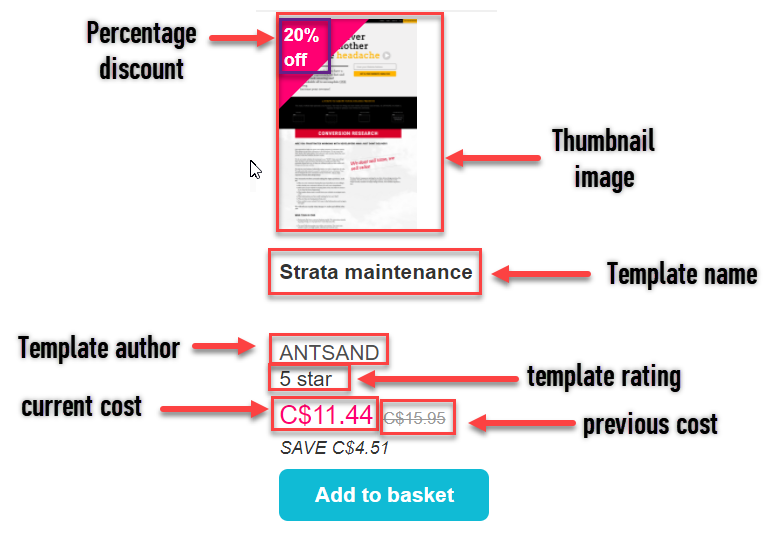
Information that needs to be displayed for each website template
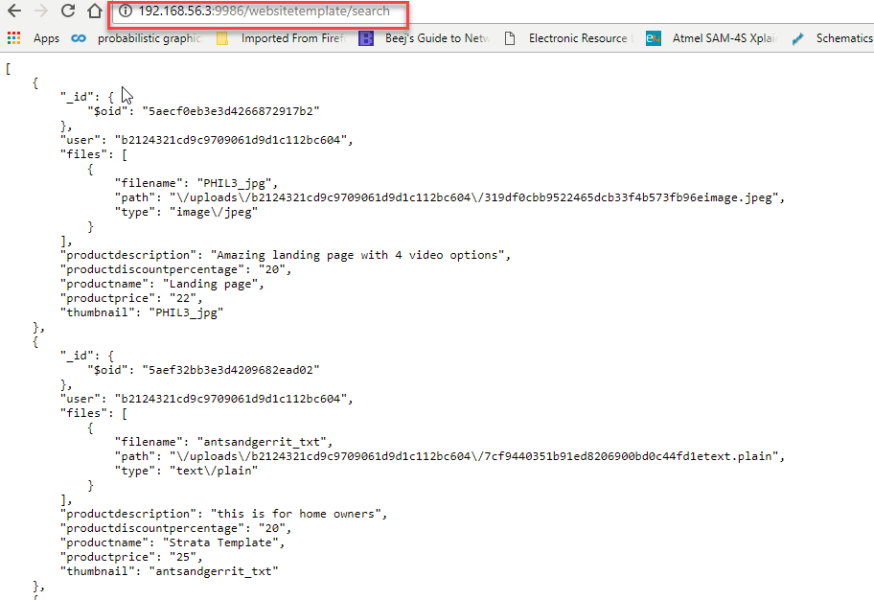
The JSON file response would look something like this.
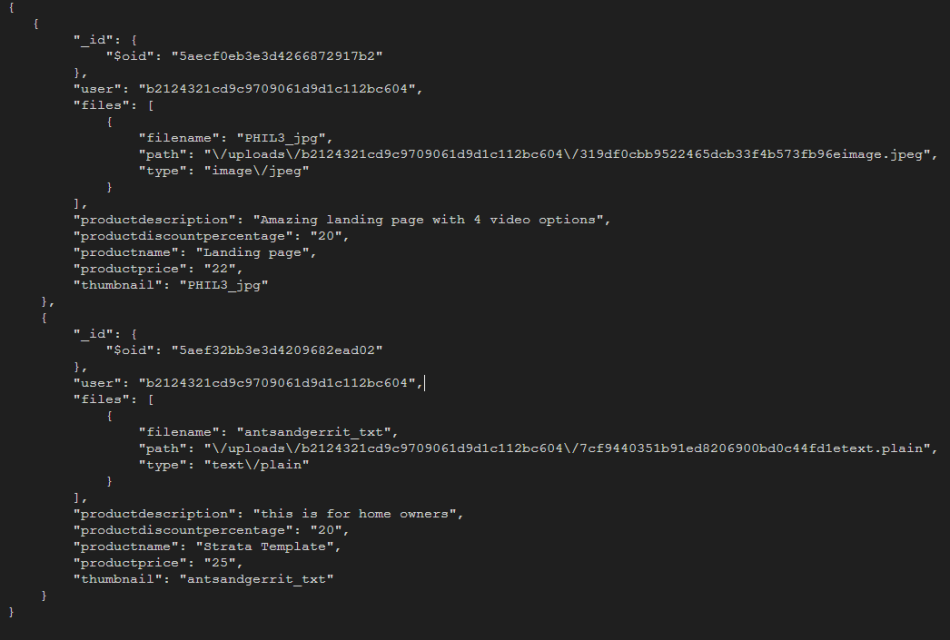
Phlacon being a highly customizable framework, there are various ways in which you can go about designing your API's. This git repository shows the different ways you can configure your phalcon application.
Creating the controller:
Let us create a new controller called WebsitetemplateController.php and create few actions in it. We can have an action for
search: Read database for website templates
Permission: anyone
write: Insert a new website template into the database
Permission: authorized users
update: Update information of the template
Permission: authorized users
delete: Delete the website template
Permission: authorized users
To give access to users, we would need to update this information in our Security.php file. For this tutorial, we just want to read the data and send it to vue to display it. We will just be making use of the search action, which is accessible to anyone.
Security.php
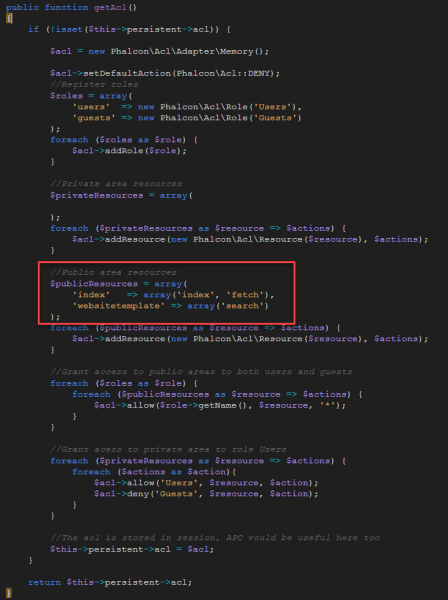
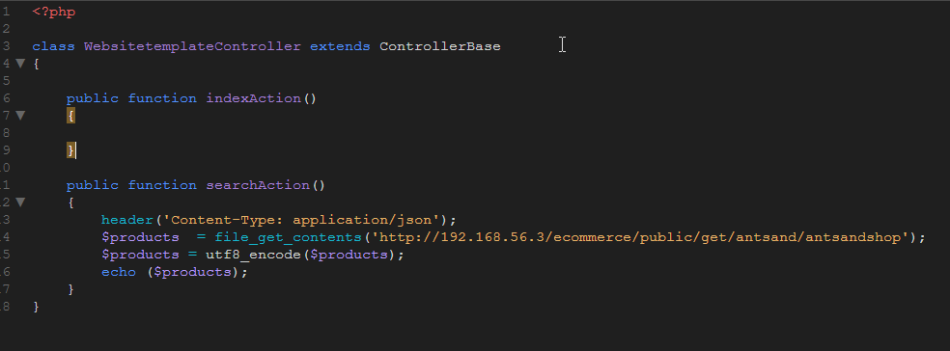
Next, we need to fetch data from the database, organize the contents in a pretty json file and echo the file to vue. In this case, I am reading the data from a local server which stores the data in mongodb. The output from the server, is a JSON file, which we then output it back to the frontend.
Now, when you type /websitetemplate/search on the webbrowser, the JSON file is printed.
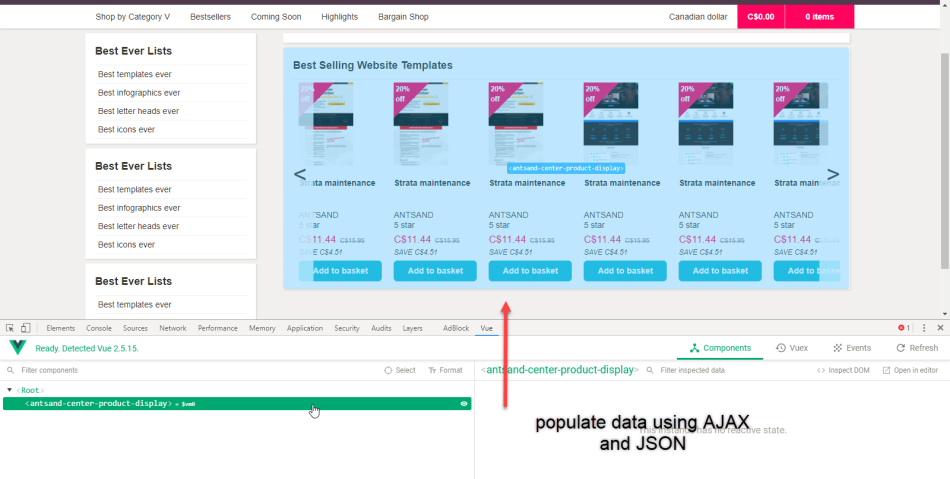
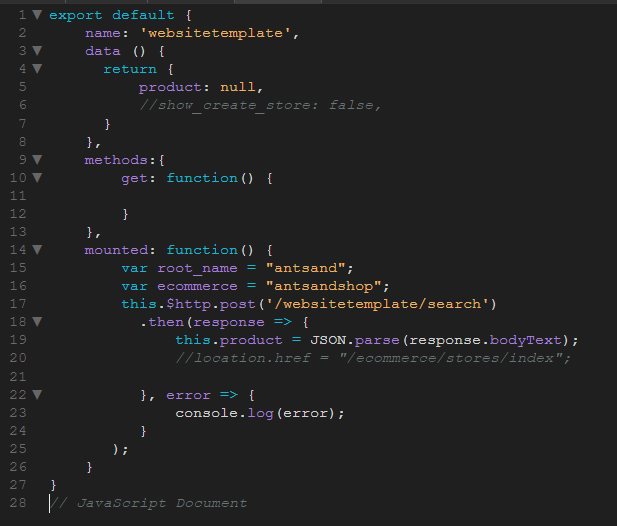
We can then ask vue, to interpret the JSON file and iterate through the array.
We can look at the vue debbuger on chrome and see if the variable 'product' has the data populated.
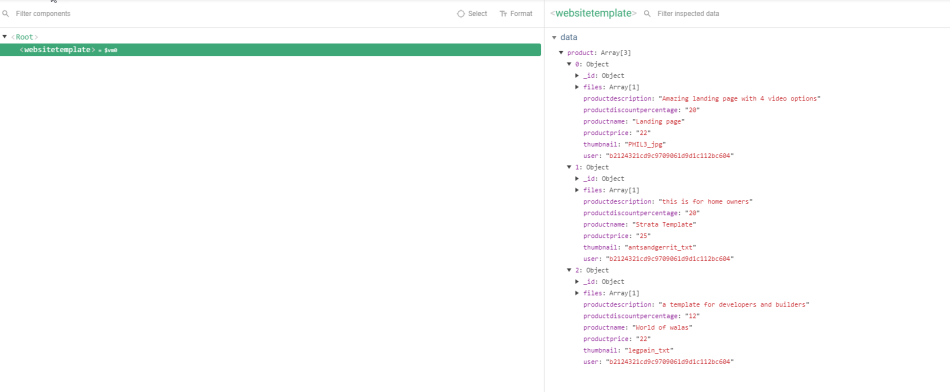
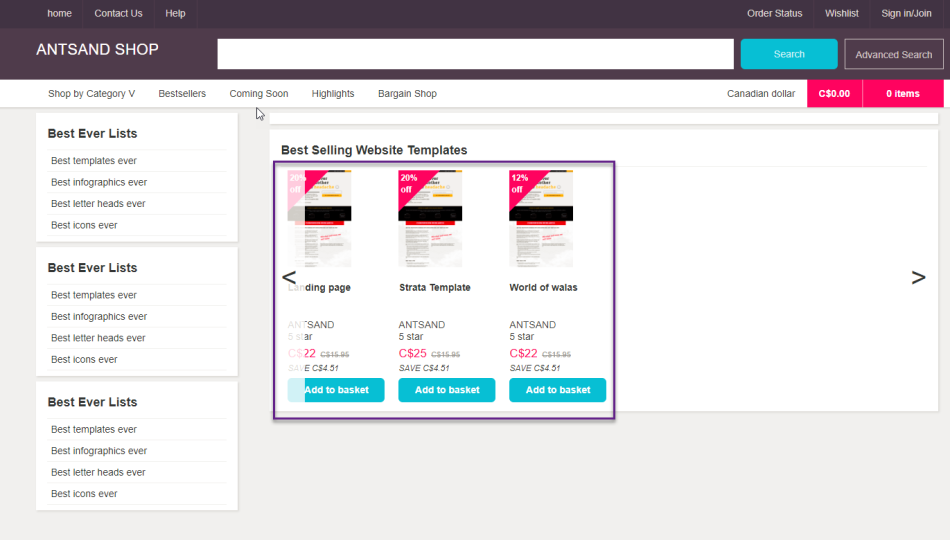
Now it is just a matter of how you want to visually display this data on the website.
If you have any questions or doubts, or better ideas and concepts please comment below.
Conclusion:
Please comment below if you have questions, ideas or how you can apply it. At ANTSAND, we apply everything we preach and teach. What we put out is based on our experience, our failures and success. We love to be transparent, as it really brings out the best in us.
The $5 monthly marketing package mentioned in the original article was an idea, not a current offer. Tell me which part of this guide helped and what still needs work.
If you want to read other blogs that might interest you, have a look below.
More Stuff from ANTSAND
Business, UI and UX:
Marketing Made Easy. Ultimate guide to making your business more marketable and profitable
Speed of Implementation for UI and UX startups
8 steps to create world class UI and UX for your startup
12 mindsets and behaviors required for running a lean startup
12 ways to maintain your website and increase sales
My mental maps for success:
39+ mental tools I use to make better decisions
If you are a programmer, you can read more on our Programming blogs:
How to integrate php and vue.js components
Integrating, php, vue and webpack with code examples
Creating restful API's using php and vue